Greetings from Joying Team
First, I want to give Joying Customer some advice:
If you want to keep the buttons lights on, you can open settings>factory setting>126>other>key light, and checked the "key light", or you can read this blog about button lights work on Joying Head Unit.
Review:
The shipping was incredibly fast; it arrived much sooner than the estimated arrival date.
In my 2010 CC installation only took a couple of minutes, but with the wiring adapter, it's a pretty tight fit. Don't expect to just slide the unit into place and be done. You'll have to tuck everything in to get it to fit properly.
And while this is noted on your packaging, if you don't intend to use a backup camera, cut the yellow wire before you finish the installation. I forgot and now the screen goes black and mutes when in reverse. There are user settings you can change to correct this, but you're better off cutting the wire like it says.
Once installed, it looks great -- looks OEM rather than aftermarket.
The UI is responsive and snappy and my steering wheel controls worked right out of the box. I haven't been able to get the mirroring to work with my iPhone 6, and the unit doesn't always connect to my mobile hotspot right away, but it's really not a huge deal. Just about anything I need to fiddle with can be taken care of while the car is warming up.
Familiarize yourself with the settings, customization, etc... trying to find/ settings while driving is incredibly frustrating and kind of dangerous.
My one complaint is that there is a light buzzing when the DLR/lights are on. If I turn them completely off it goes away, but it's faint enough that you only hear it when nothing is playing and you're sitting still, so again, not a huge deal, but annoying nonetheless.
Showing posts with label car audio.. Show all posts
Showing posts with label car audio.. Show all posts
Friday, January 22, 2016

Thursday, January 21, 2016
Joying Universal Double Din Car Stereo Installed in 2008 Toyota Tacoma
Thank you for Support Joying
I have only used this radio for a couple of weeks now but so far I really love it. I installed it in a 2008 Toyota Tacoma and there was plenty of room and the install was fairly easy. The wires were labeled and the colors were standard so splicing to my connector harness was simple. I bought it for the navigation and DVR/dashcam but it comes with many other inputs. It beats the hell out of $700 dollar plus units that only offer navigation capable units that you have to also buy an additional antenna for. This outfit comes with the antenna and a few other goodies. It has video input for adding a Video player (this model doesn’t have DVD slot) but I don’t need that and I don’t play CDs so Its not needed in my case. It has a very good backup camera with a wide view and very good visibility day or night. The radio reception is nice and clear even on my weakest stations. Technical support response is fairly quick and easy to follow. The youtube videos are a little hard to understand because of the Chinese accent of the guy in the video but if you watch a couple of times you can start to understand him a little easier.
Below is the Review from Terry:
I have only used this radio for a couple of weeks now but so far I really love it. I installed it in a 2008 Toyota Tacoma and there was plenty of room and the install was fairly easy. The wires were labeled and the colors were standard so splicing to my connector harness was simple. I bought it for the navigation and DVR/dashcam but it comes with many other inputs. It beats the hell out of $700 dollar plus units that only offer navigation capable units that you have to also buy an additional antenna for. This outfit comes with the antenna and a few other goodies. It has video input for adding a Video player (this model doesn’t have DVD slot) but I don’t need that and I don’t play CDs so Its not needed in my case. It has a very good backup camera with a wide view and very good visibility day or night. The radio reception is nice and clear even on my weakest stations. Technical support response is fairly quick and easy to follow. The youtube videos are a little hard to understand because of the Chinese accent of the guy in the video but if you watch a couple of times you can start to understand him a little easier.
Below is the Review from Terry:
Monday, January 11, 2016
How to Choose a Suitable Universal Double Din Head Unit----Joying
Thanks for your attention to Joying!
My topic today is "how to choose a suitable universal double din head unit on Joying".
First, please measure and confirm how much space do you have to install the aftermarket head unit.
For example, we have different sizes of universal model: 178*100mm, 178*102mm.
You need to confirm that you have suitable space to install it. Maybe, you need to buy a dash kit
for your car. If so, you have to pay attention to the interior size of the dash kit, it should be 178*100mm or 178*102mm. Sometimes, the head unit is a little big for dash kit. Don't worry, please watch a video about how to modify dash kit.
Our universal models come with ISO harness, as show below:

You should know, ISO harness is not special harness for your car. You can purchase Joying harness or ISO harness adapter for your car.
If you want to know more about the connection, please read this blog.
ISO car radio harness adapter:


Note: JOYING all android head unit doesn't support original Bluetooth, rear view camera and GPS antenna.
And if your car needs can-bus and it has factory amplifier, please contact us in advance.
Again let me remind my friends, if your car needs can-bus and it has factory amplifier, please contact us in advance.
My topic today is "how to choose a suitable universal double din head unit on Joying".
First, please measure and confirm how much space do you have to install the aftermarket head unit.
For example, we have different sizes of universal model: 178*100mm, 178*102mm.
You need to confirm that you have suitable space to install it. Maybe, you need to buy a dash kit
for your car. If so, you have to pay attention to the interior size of the dash kit, it should be 178*100mm or 178*102mm. Sometimes, the head unit is a little big for dash kit. Don't worry, please watch a video about how to modify dash kit.
Our universal models come with ISO harness, as show below:
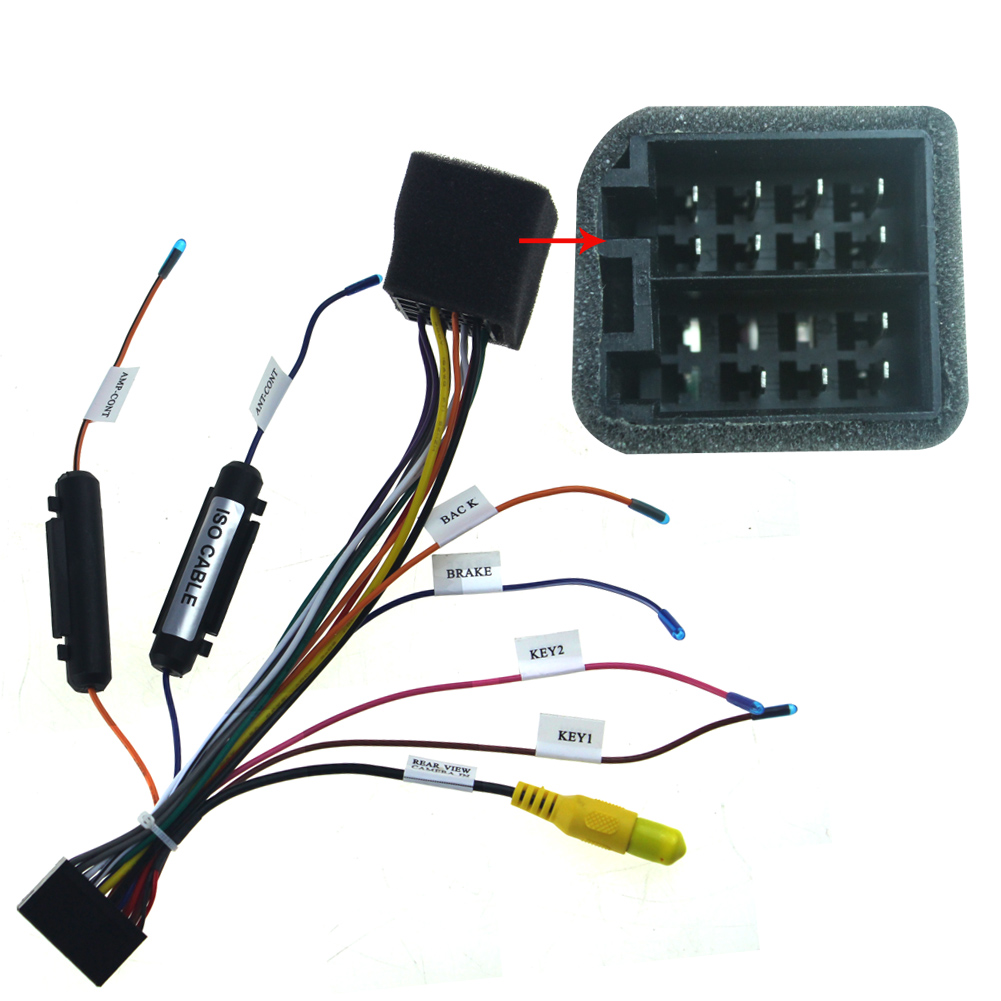
You should know, ISO harness is not special harness for your car. You can purchase Joying harness or ISO harness adapter for your car.
If you want to know more about the connection, please read this blog.
ISO car radio harness adapter:


We also have a latest model, 10.1" HD Screen, it has less restrictions of installation size.
If you are interested in this product, you can purchase it on carjoying.com or Amazon.com

And if your car needs can-bus and it has factory amplifier, please contact us in advance.
Again let me remind my friends, if your car needs can-bus and it has factory amplifier, please contact us in advance.
Have a great day.
Joying Team
Wednesday, December 16, 2015
Joying Best Android Car Stereo Head Unit for Volkswagen, Screen Size: 7"; 8"; 10.1"
Run pure android 4.4.4 kitkat System, CPU: RK3188 1.6GHz Cortex A9 Quad Core, ROM 16GB


We also sell them on Amazon.com
Please contact us via Email: carjoying@163.com
Wednesday, December 9, 2015
Quad Core DVD Player- Effect Pictures Show
Please be trust Joying
Specific car models: Double Din
OS: Android 4.4.4 kitkat system
Support 54 kinds of languages
CPU: RK3188 1.6GHz Cortex A9 Quad Core
Android Phone Mirroring
Airplay for iPhone, can't support IOS 9.0 (9.0+)
Support 3G/ 4G/ Wifi hotspot sharing from your phone
Support Google maps, Waze, Sygic and other maps
If you want to know more information, please contact us.
Skype: amy-echo
E-mail: carjoying@163.com

Specific car models: Double Din
OS: Android 4.4.4 kitkat system
Support 54 kinds of languages
CPU: RK3188 1.6GHz Cortex A9 Quad Core
Android Phone Mirroring
Airplay for iPhone, can't support IOS 9.0 (9.0+)
Support 3G/ 4G/ Wifi hotspot sharing from your phone
Support Google maps, Waze, Sygic and other maps
If you want to know more information, please contact us.
Skype: amy-echo
E-mail: carjoying@163.com

Monday, November 30, 2015
Installed in 2015 Toyota Tacoma
Joying Most Popular Android 4.4 Head Unit


1. The dimension of this unit is 178*100mm, and comes with ISO harness.
You should confirm this before purchasing.
2. You may need to buy a dash kit and special harness or ISO radio adaptor for your car.
If you are not sure, please send us some pictures of your car center dashboard and factory car radio harness connector.
3. It doesn't required the Metra AWSC-1 to get the steering wheel controls to work.
Because Toyota Tacoma don't support can-bus, you just need learn and set set the buttons. Here is the instruction, please click here.
If you have questions about Joying Head unit/ Car Stereo.
Please contact us via,
E-mail : echojoying@gmail.com

Saturday, November 28, 2015
Really happy when we receive thank-you letters from customers
I'm grateful for thank-you letter from Joying customer.
We appreciate the constant support for Joying.
Below is the copy of letter:
First of all, I would like to thanks for your patient and lengthy support for my item I purchased
from Carjoying store. Your support is very promptly and professional, accuracy and problem
solving. We went thru all kind of problems from user problem, software problem, hardware problem and so on.... I appreciate that also because your went extra miles to help me not just simple customer service. Your are the best online customer service that I have chance to work with in more than around 15 years of purchasing online.
Second, I possibly not bother and consume your valuable time anymore since: EVERYTHING IS WORKING IN ORDER and I happy with the unit.
One more time THANK YOU in the Thanksgiving season here :-)
Have a great day.
If you are interested in Joying, you can contact us via:
E-mail : carjoying@163.com
Skype: amy-echo
Friday, November 27, 2015
New Arrival--- 10.1 Inch Screen Screen
LATEST JOYING 2015 AFTERMARKET VOLKSWAGEN/SKODA/SEAT 10.1 INCH SINGLE DIN ANDROID 4.4.4 KITKAT CAR AUDIO STEREO/HEAD UNIT.


Detail Show:


Applicable models:

. Quad Core Android 4.4.4 Kitkat OS Capacitive Touch screen on Volkswagen/Skoda/Seat
. CPU: RK3188 1.6GHz Cortex A9 Quad Core, Resolution 1024*600
. RAM:DDR3 1G, 16 GB memory
. 9 EQ Equalizer for music
. Support steering wheel control, OBD2
. Built-in GPS navigation, support Google maps, Waze, Sygic, TomTom, Here maps
. Support 9 & more Color Panel Lights
. Bulit-in WiFi, Support 3G/4G/Wifi hotspot sharing, Support 3G Only WCDMA network
. Bulit-in Bluetooth for hand free phone call, Support1080P
. Support car DVR
. Airplay for iPhone , Can't support IOS 9.0
. PAL and NTSC support Rear view camera
. Wireless Screen Mirroring Function( Android phone and iPhone)
. Thickened Alumium heat sink and strong unit design
. Built-in Google play store, Apps for Uber...Google Voice
. USB, SD, Auxiliary Input, Free 8 GB Maps Card for loading maps so fast 44 M/s
. FM / AM RDS Radio Data System, Sub woofer, Free External Mic, Free GPS antenna
. CPU: RK3188 1.6GHz Cortex A9 Quad Core, Resolution 1024*600
. RAM:DDR3 1G, 16 GB memory
. 9 EQ Equalizer for music
. Support steering wheel control, OBD2
. Built-in GPS navigation, support Google maps, Waze, Sygic, TomTom, Here maps
. Support 9 & more Color Panel Lights
. Bulit-in WiFi, Support 3G/4G/Wifi hotspot sharing, Support 3G Only WCDMA network
. Bulit-in Bluetooth for hand free phone call, Support1080P
. Support car DVR
. Airplay for iPhone , Can't support IOS 9.0
. PAL and NTSC support Rear view camera
. Wireless Screen Mirroring Function( Android phone and iPhone)
. Thickened Alumium heat sink and strong unit design
. Built-in Google play store, Apps for Uber...Google Voice
. USB, SD, Auxiliary Input, Free 8 GB Maps Card for loading maps so fast 44 M/s
. FM / AM RDS Radio Data System, Sub woofer, Free External Mic, Free GPS antenna
Video Demo:
If you are interested in our head unit, please contact us.
E-mail Address: carjoying@163.com
Skype: amy-echo
Welcome the incoming letter consultation.
Monday, November 16, 2015
Fast Shipping Service - US, EU. AU
Purchased the item on Friday at 2pm, arrived Saturday by noon!!! How can you best that??? Next day delivery was 31.00, for 3 items!! Very happy with that service!!!!
Yes, it's a review from Joying Customer.
We have Warehouse in Germany, America, Australia, and we sell our products Via Company Website, Amazon.com, eBay.de, eBay.com, eBay.au, eBay.uk, now.
You can choose any shop way which you like.
You can also purchase which ships from China, we will ship it within 1-2 days. And provide Free Shipping Service.
Support DHL shipping for most country .

If you are interested in Joying, Please be free to contact us.
It's always our pleasure to serve you.
E-mail Address: carjoying@163.com
Yes, it's a review from Joying Customer.
We have Warehouse in Germany, America, Australia, and we sell our products Via Company Website, Amazon.com, eBay.de, eBay.com, eBay.au, eBay.uk, now.
You can choose any shop way which you like.
You can also purchase which ships from China, we will ship it within 1-2 days. And provide Free Shipping Service.
Support DHL shipping for most country .

We test every Product before shipping.
Please visit Youtube.com, we provide lots of true and overall videos of our products.
If you are interested in Joying, Please be free to contact us.
It's always our pleasure to serve you.
E-mail Address: carjoying@163.com
Saturday, November 14, 2015
How to share mobile network to Android Head Unit
When we are outdoor, it has no WiFi nearby. How to make Joying Android Head Unit connect network?
I record the process step by step, and share the images.
1. Picture 1, Close the WiFi , and set my phone to 3G data. Then click "more"
2. Picture 2, Now, as you can see in this picture. I click "tethering&portable hotspot"
3. Picture 3, Turn on the "Portable hotspot" , and "set up portable hotspot"
4. Picture 4, After I click set up portable hotspot. Then, I set the password "123456789", and click "OK" and save successfully.
5. Picture 5, I boot the head unit. And open the "setting" of the unit.
Turn on "Wi-Fi", this unit searched the network "MI 3-54891"
6. Picture 6, select MI 3-54891, now you need to enter password
7. Picture 7, Enter "123456789", and click "connect"
8. Picture 8, Obtaining IP address
9. Picture 9, Connected
10. Picture 10, Open the page successfully.


Demo Video:
I record the process step by step, and share the images.
1. Picture 1, Close the WiFi , and set my phone to 3G data. Then click "more"
2. Picture 2, Now, as you can see in this picture. I click "tethering&portable hotspot"
3. Picture 3, Turn on the "Portable hotspot" , and "set up portable hotspot"
4. Picture 4, After I click set up portable hotspot. Then, I set the password "123456789", and click "OK" and save successfully.
5. Picture 5, I boot the head unit. And open the "setting" of the unit.
Turn on "Wi-Fi", this unit searched the network "MI 3-54891"
6. Picture 6, select MI 3-54891, now you need to enter password
7. Picture 7, Enter "123456789", and click "connect"
8. Picture 8, Obtaining IP address
9. Picture 9, Connected
10. Picture 10, Open the page successfully.


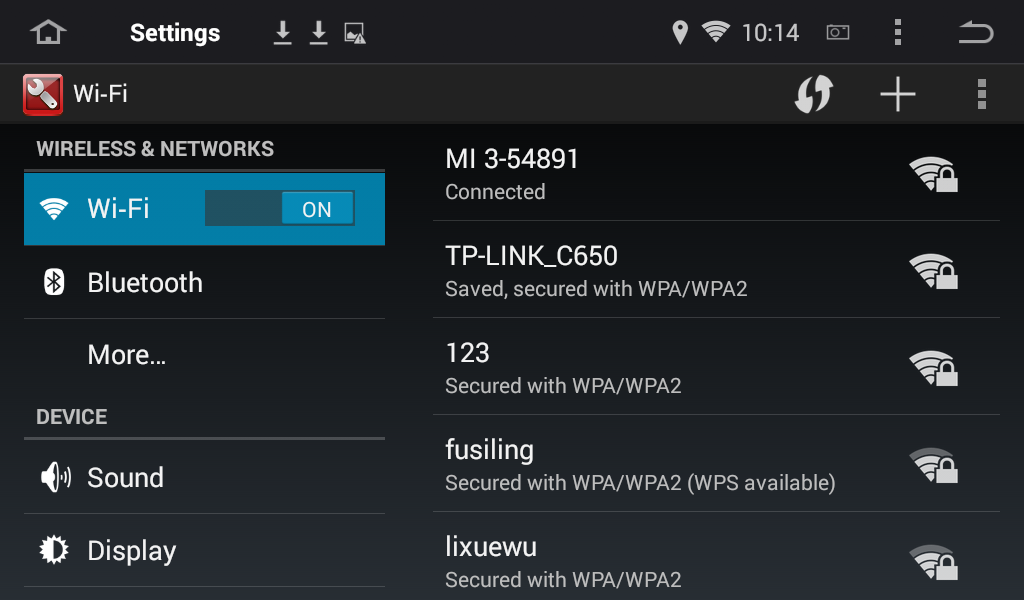

Demo Video:
Tuesday, October 27, 2015
If You Want a New Android Car Stereo for Your Toyota Camry
This is the experience from Frank
He ordered this Car stereo from Joying:


He ordered this Car stereo from Joying:
There is no JBL system of his car.

Note: If it has JBL system, please contact us with the JBL amp wiring diagram of your car, or tell us the quantity of the car speakers.
1. This Car stereo is for Toyota Camry 2007-2011, you don't need to buy other harness or dash kit for your car.
Frank e-mail me about his questions:
Hello,
I have a question about installing this radio in my 2009 Toyota Camry. My Camry is the base model and does not have the JBL sound system and does not have navigation.
The wiring harness connections are easy but there is one single factory wire that plugs into the factory radio right above where the am/fm antennae plugs in. The connector is blue, round and looks just like the am/fm antennae connector only smaller. What is this wire for and where do I plug it into the new Joying unit?

Answer:
a.You just need to connect the "white round connector" to the '"Radio-ANT" (please note red circle)
b. Please wrap up the metal part of blue connector (smaller one), to minimize electronic interference

2. It can also support the Steering Wheel Control of your car.
You don't have to buy any accessories.
You just need to learn and set the buttons, then the steering wheel control can work on this stereo.
If you are interested in our products, please be free to contact us.
E-mail : amjoying@outlook.com
Monday, October 19, 2015
Volkswagen 8 Inch Quad Core Android 4.4 Kitkat in Dash GPS Navigation System

Specific car models: Volkswagen (More information)
OS: Android 4.4.4 kitkat system
Language: 54 kinds of languages
CPU: RK3188 1.6GHz Cortex A9 Quad Core
RAM: SAMSUNG DDR3 1GBHigh Resolution 1024*600
NAND Flash: 16GB
9 EQ Equalizer for music
Support 9 & more Color Panel Lights
Working Voltage: 10.8~14.8V
Maximum power(front&rear): 45W×4
Boot time: 12-25 seconds
OBD Scanner:ELM327 OBD2
DVD Player: No
 (Customer Feedback)
GPS navigation:Built-in GPS navigation
Support Google maps, IGO, Waze, Sygic and other maps
•AM/FM Radio:Radio Chip: TDA7786 (Philips)
Built-in RDS Radio Receiver Function AM and FM Tune
•3G/Wifi:WIFI: Built-in WIFI Module
3G: Only support 3G WCDMA SIM for 3G dongle. Support 3G/ 4G/ Wifi hotspot sharing from your phone
Mirroring:Android Phone Mirroring, you have to connect your android phone by USB.
Note: Do Not reset the factory data for this function.
Airplay for iPhone 6/6 plus/5/5c/5S/4/4S
•Bluetooth:Bluetooth: BC06
Built-in Microphone Support Phone Book
Bluetooth for hand free phone call

If you are interested in our products, Please be free to contact us.
E-mail Address: carjoying@163.com
-Joying Team
Friday, October 16, 2015
I cannot receive any radio stations though I installed the booster
Robert bought an Android head unit from Joying for his Hyundai IX35

However, he told me, he can't receive any radio station after he installed a Antenna Signal Amplifier Booster.
We analyzed the reason according to the information he provided.
1. Don't Set the right "Radio Band"
2. Don't Connect the radio Antenna correctly.
Then, I told he the solution:
1. Check the "Radio Band"
a. You should open "setting" and find the "factory setting"
b. Click the "factory setting", and Enter the password "126"
c. Select the right "Radio Band"
2. Send us some pictures about the connection of booster.
Later, he send me a picture:

We checked it, and found out the reason.The booster didn't connect with a power supply.
Please note the Blue circle:

Here I attach a picture about the instruction of How to connect ANT-208 Antenna Signal Booster

If you have any questions about Joying Head Unit, Please contact us.
We are always at your service.
Email Address: carjoying@163.com
echojoying@gmail.com
Subscribe to:
Posts (Atom)