Showing posts with label GPS Navigation System. Show all posts

Tuesday, February 7, 2017

Convert Joying universal double din radio to Honda ( 2013 Honda Civic Si )

Vehicle model: 2013 Honda Civic Si with premium audio system


 (After installing)

Joying product: JY-UL135N2:
When our customer place order, we have two suggestions:
1. Purchase harness and adapter from third-part, such as PAC, AXXESS.
2. Purchase Joying Civic harness and can-bus decoder, but requires to modify the mainboard.
This customer decides to use our harness and modify mainboard by himself.

Joying Civic harness with can-bus decoder:
Modify Mainboard
Before:


After: 

Problems after installation:
1. No audio
2. Steering wheel control doesn't work
So he conatct us again. We suggest to change can-bus protocol in the CarMediaSettings.


Feedback:
I finally have success with this system. Before I changed the canbus settings I went ahead and converted the bare wire to RCA connectors. and I had to move one pin on the harness that wasn't utilized so that I could have power going to the amplifier. After that I connected the unit and changed the settings and everything worked wonderfully. I wanted to thank the engineers for their help and Bella for all your help with this equipment. I can supply some photos as I did snap a few.


Here are installation notes from car owner:


This first part I removed the ground wire to supply the remote turn on circuit for the stock amplifier. This wire gets moved to the other side of the pink wire shown here.


I then cut the cable and connected the orange and black cable to that black cable. After I did that I started cutting the main output connectors from the harness that connects to the radio itself. These I connected to RCA’s to create the low line level out from the radio that the amplifier required. For this I used these RCA adapters.


I then followed these instructions for creating the RCA cable connections with my soldering iron.
After that I connected everything to my car and the speakers started to work. This was great news as I didn’t receive any audio before. The canbus settings I changed to Honda Canbus working on the XP(2012) version. Once I did this the unit realized there was and MCU update and proceeded with the update and after that everything worked. My steering wheel controls for volume and the left and right buttons and source all work. The Bluetooth buttons have yet to work but I haven’t really tried to get them to work yet. The only issue I am running into now is trying to get the rear view camera to display on the headunit and eventually getting the subwoofer connector powered on for the subwoofer in the back.


Wednesday, June 22, 2016

Joying head unit can't start once installed--RESOLVED

Joseph purchased JY-UL135 Joying Android 5.1 lollipop double din head unit from us.


Here are some problems occurred when installing.
He said he already have a Metra harness from a previous installation, and his truck is a 2004 Ford Excursion Limited.

This item is universal style and comes with ISO harness, I'm worried Joseph will have questions about the connection, so I send him a instruction.

He has problem when connect the backup camera and steering wheel control, but he solved them after read the instruction I sent.


Finally,  Joseph got everything working. 
However, the head unit can't start.  It said android shutting down and then the unit will not power on.

Joseph told me that he has checked all connections and all fuses.


We can't make sure the cause of it, and ask Joseph help us check and test the unit, we need to know if there is any issue on our products.


How to test Joying android head unit:


We found there is no problem on Joying unit. Joseph said "I got it working finally.  I had a blown fuse on the accessory wire."


Saturday, May 7, 2016

Questions&Answer-- How to connect connect the Aux jack on my phone to the Joying unit

Questions: 


Hello,

I would like to connect the Aux jack on my phone to the Joying unit. Which is the input on the back of the unit that I should use?
Kind Regards


Answer: 

Hello

You can connect our head unit through "L-IN" and "R-IN"
Do you have that audio cable? It requires that cable. (RCA port, the other is 3.5mm-port )
Please check the attachments.

Best regards


Focus more on our site:

Tuesday, March 15, 2016

2016 Newest Head Unit: Android 5.1 Lollipop OS + 10.1" HD Touch Screen

Auto Parts Manufacturer 12 Years


Welcome to subscribe Joying YouTube

Buyer Guidance:
1. Panel Size: 260*160mm
Please confirm that you have suitable space to install it
2. ISO harness
This item comes with ISO harness, you can buy an ISO harness adapter from other seller, or order special harness on Joying Store
3. Other
a. If you car supports can-bus, you need to buy a can-bus decoder by yourself
b.If you car has factory amplifier, you need to buy amplifier adapter or bypass the amplifier system

Feature:
1. Android 5.1.1 Lollipop
*Latest operating system
2. Imported original Screen: 
* Size: 10.1 Inch
* HD: 1024*600 
*Capacitive Multi-touch Screen
* Special visual experience
3. Easy Installation
a. Please view product images
b. Please watch this installation video: https://youtu.be/MdXXZiLgjoE

Specification:
Brand: JOYING
OS: Android 5.1.1 Lollipop system
CPU: RK3188 1.6GHz Cortex A9 Quad Core
Screen Size: 10.1 Inch
High Resolution: 1024*600
RAM: SAMSUNG DDR3 1GB
Nand Flash: 16GB
9 EQ Equalizer for music
Language: 54 kinds of languages
Support 9 & more Color Panel Lights
Power AMP IC: TDA7388
Decoding IC: 8202VGQ
Working Voltage: 10.8~14.8V
Video Decoder: 1080P HW
Maximum power: 45W*4

Mirroring
Android Phone Mirroring, you have to connect your android phone by USB
Airplay for iPhone
Note: Do Not reset the factory data for this function
GPS navigation:
Support Google maps, Waze, Sygic and other maps
Support 2D/3D map
Support Voice Guidance
3G/4G/WiFi
WIFI: Built-in WIFI Module
3G: Only support 3G WCDMA SIM for 3G dongle
Support 3G/4G hotspot sharing from your phone
Bluetooth
Support Phone Book
Support hands-free calls
Support connect OBD dongle and your phone simultaneously

Thank you for reading.


Wednesday, March 9, 2016

Questions & Answers----Any special harness that I need for a 2012 Nissan Xterra?

Joying 7" 2 Din Android 4.4 Quad Core Car Stereo


Question: Any special harness that I need for a 2012 Nissan Xterra? 

Answer: Please check this image about 2012 Nissan Xterra car center dashboard
Is it the same as your car? If so, you may need a installation frame for your car.


This unit only comes with ISO harness, so you need an ISO harness adapter, or you can purchase Joying Nissan harness on our store.
We have two kinds of Nissan harness, please choose the right one for your car: 
Nissan harness 1
Nissan harness 2

Note: If your car has factory amplifier, such as Bose amplifier, you need to buy a Bose amplifier adapter. You can also bypass Bose amplifier and connect speaker wires directly.
If you have question, please be free to contact us again.

Tuesday, March 8, 2016

Reviews for Joying 10.1" Android 4.4.4 Double Din Car Stereo Universal Style

Hello,
Today's special is Joying newest universal car stereo. 
Machine Model: JY-UQ132

You can visit our website or amazon.com to learn more information about this type.
              

平均5.0 星the best head unit you will ever buy
Unlimited possibilities.. the best head unit you will ever buy... quad core processor is unbelievably fast.. tablet is very responsive.. customizable


5.0 out of 5 starsDoes what it says and seems well supported.
UPS lost my head unit at their Dallas hub. That or one of their warehouse workers let it "fall off the truck" either way I communicated this to Joying and after a few days wait to make sure it was lost and a few calls to UPS to make sure they note it as lost, the nice folks at Joying sent another one. This one arrived fast and works just fine. I drive an Excursion and audiophile sound would be lost on a truck that noisy, so I didn't expect that, but I am pleasantly surprised that it sounds every bit as good as the stock head unit. The features all work although the included GPS isn't fun to use. I also don't know why a universal fit stereo comes with a plug on both ends of the harness. Easy enough to cut off to wire in to your vehicle specific install plugs though. Also, this does appear to be a bit wider than your standard double din setup. The install kit for my vehicle does not fit right without trimming. I expected to have to do some of that though so it is all OK with me. I would like the USB to have more power but it works with flash drives just fine and that is what it is for. Speaking of flash drives, they sent one in the box that looks like a domino. I like when companies include stuff like that. Overall I am satisfied.


4.0 out of 5 starsGreat little head unit
Great little head unit, only complaint is that i keep having problems with the GPS, i get an error stating that i need to buy my own licence to use ?


Monday, January 25, 2016

Android 4.4.4 kitkat Quad Core Double Din Touch Screen Car Stereo for Audi A3 2003-2013 S3 2003-2011

Brand: Joying


Applicable Models: Audi A3 2003-2013 S3 2003-2011

Features:
OS: Android 4.4.4 kitkat system (Most recent and stable version)
CPU: RK3188 1.6GHz Cortex A9 Quad Core (Responsive, faster than Dual Core)
DVD Player: Yes 
Google Play Store: Yes
Brightness Control: Yes 
Custom Boot Screen: Yes
Mirrorlink: Yes
Boot Time: 12-25 seconds
5 points Capacitive Touch Screen
Selectable Color for Button lights 
9 EQ Equalizer for music
54 kinds of languages 
GPS navigation: 
Chip: U-BLXO G6010 
2D/3D Map: Yes 
Voice Guidance: Yes 
Music/Bluetooth can working at the same time While GPS working 
Bluetooth:
Support Phone Book, hans-free calls, playing music from your phone. 
Support to connect phone and ELM327 OBD2 simultaneously
AM/FM Radio: 
Radio Chip: TDA7786 (Philips) 
Support RDS Radio Receiver Function 
AM and FM Tuner

Friday, January 22, 2016

The UI is Responsive and Snappy and My Steering Wheel Controls worked right

Greetings from Joying Team
First, I want to give Joying Customer some advice:
If you want to keep the buttons lights on, you can open settings>factory setting>126>other>key light, and checked the "key light", or you can read this blog about button lights work on Joying Head Unit.


Review:
The shipping was incredibly fast; it arrived much sooner than the estimated arrival date.

In my 2010 CC installation only took a couple of minutes, but with the wiring adapter, it's a pretty tight fit. Don't expect to just slide the unit into place and be done. You'll have to tuck everything in to get it to fit properly.

And while this is noted on your packaging, if you don't intend to use a backup camera, cut the yellow wire before you finish the installation. I forgot and now the screen goes black and mutes when in reverse. There are user settings you can change to correct this, but you're better off cutting the wire like it says.

Once installed, it looks great -- looks OEM rather than aftermarket.

The UI is responsive and snappy and my steering wheel controls worked right out of the box. I haven't been able to get the mirroring to work with my iPhone 6, and the unit doesn't always connect to my mobile hotspot right away, but it's really not a huge deal. Just about anything I need to fiddle with can be taken care of while the car is warming up.

Familiarize yourself with the settings, customization, etc... trying to find/ settings while driving is incredibly frustrating and kind of dangerous.

My one complaint is that there is a light buzzing when the DLR/lights are on. If I turn them completely off it goes away, but it's faint enough that you only hear it when nothing is playing and you're sitting still, so again, not a huge deal, but annoying nonetheless.

Thursday, January 21, 2016

Joying Universal Double Din Car Stereo Installed in 2008 Toyota Tacoma

Thank you for Support Joying

I have only used this radio for a couple of weeks now but so far I really love it. I installed it in a 2008 Toyota Tacoma and there was plenty of room and the install was fairly easy. The wires were labeled and the colors were standard so splicing to my connector harness was simple. I bought it for the navigation and DVR/dashcam but it comes with many other inputs. It beats the hell out of $700 dollar plus units that only offer navigation capable units that you have to also buy an additional antenna for. This outfit comes with the antenna and a few other goodies. It has video input for adding a Video player (this model doesn’t have DVD slot) but I don’t need that and I don’t play CDs so Its not needed in my case. It has a very good backup camera with a wide view and very good visibility day or night. The radio reception is nice and clear even on my weakest stations. Technical support response is fairly quick and easy to follow. The youtube videos are a little hard to understand because of the Chinese accent of the guy in the video but if you watch a couple of times you can start to understand him a little easier.

Below is the Review from Terry:


Monday, January 11, 2016

How to Choose a Suitable Universal Double Din Head Unit----Joying

Thanks for your attention to Joying!
My topic today is "how to choose a suitable universal double din head unit on Joying".

First, please measure and confirm how much space do you have to install the aftermarket head unit.  
For example, we have different sizes of universal model: 178*100mm, 178*102mm.
You need to confirm that you have suitable space to install it. Maybe, you need to buy a dash kit
for your car. If so, you have to pay attention to the interior size of the dash kit, it should be 178*100mm or 178*102mm. Sometimes, the head unit is a little big for dash kit. Don't worry, please watch a video about how to modify dash kit.

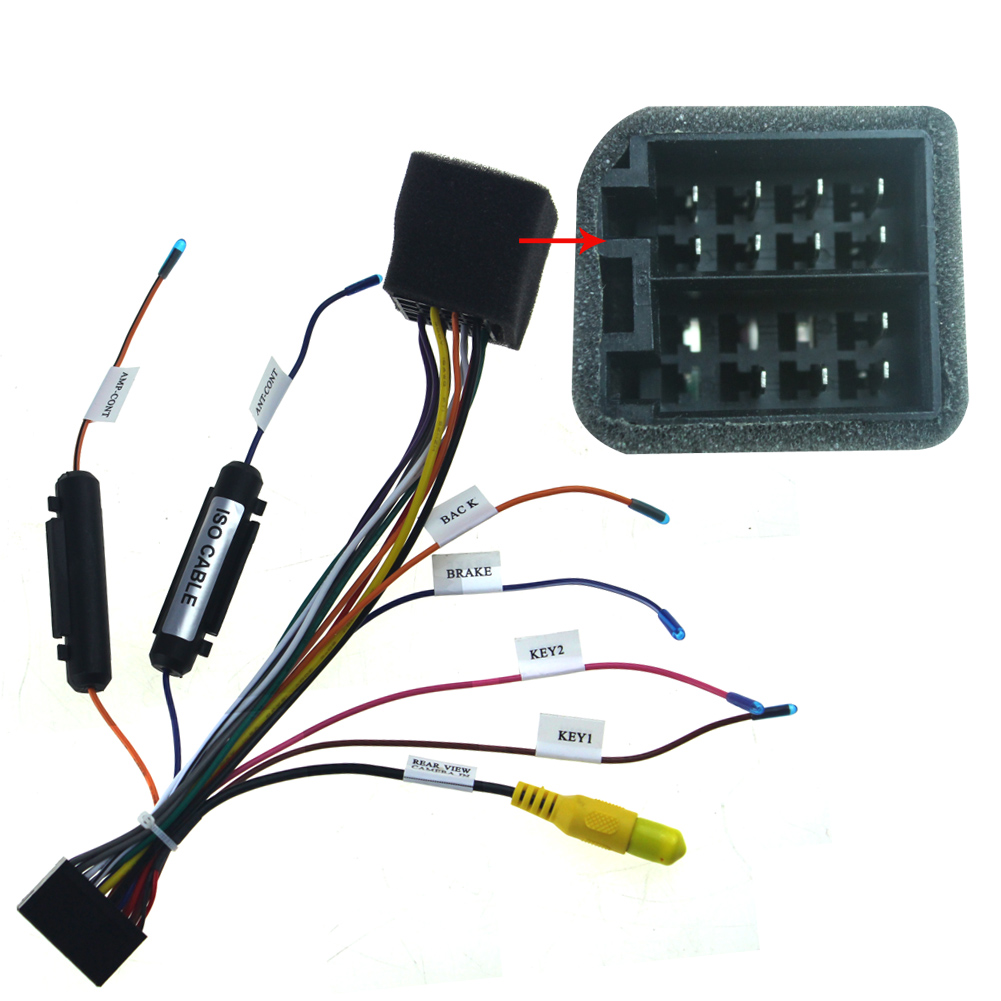
Our universal models come with ISO harness, as show below:


You should know, ISO harness is not special harness for your car. You can purchase Joying harness or ISO harness adapter for your car.
If you want to know more about the connection, please read this blog.

ISO car radio harness adapter:


We also have a latest model, 10.1" HD Screen, it has less restrictions of installation size.
If you are interested in this product, you can purchase it on carjoying.com or Amazon.com


Note: JOYING all android head unit doesn't support original Bluetooth, rear view camera and GPS antenna.

And if your car needs can-bus and it has factory amplifier, please contact us in advance.
Again let me remind my friends, if your car needs can-bus and it has factory amplifier, please contact us in advance.


Have a great day.
Joying Team

Saturday, January 9, 2016

Updated a Video for This unit, Small Price For Huge Features!---Customer Review for 10.1 Inch Volkswagen Car Stereo


If you want it, please contact us soon. We have stock it in US warehouse and EU warehouse
Please be free to contact us:
E-mail: carjoying@163.com
Skype: amy-echo

Below is the copy of review:
OK, so I've had the unit running in my car for a week, and time to review this sucker! I LOVE IT! The screen is huge! Just know going in, that this thing looks like a tablet, stuck in front of your radio opening! This is not an OEM style head unit, which was fine with me.

First let me point out that I bought this for my personal car, a 2013 VW Jetta with the Fender sound system. I didn't realize at the time I purchased it, that the Fender system's amp was turned on and off by the Can-Bus. When I tried to install this head unit, it did not power the amp so I had no sound with my speakers. I sent CarJoying a message through Amazon, and they quickly replied with a solution, a new Can-Bus adapter that they would have to ship from China. I did have to pay $42 for it, but I received it in 3 days. Cudos CarJoying

While I was waiting, I installed the unit in my work vehicle, also a 2013 VW Jetta, but with the standard stock sound system. It worked perfectly in it without any issues. I ran the unit with the stock ROM for 2 days. It works just fine with the stock rom, the only quirk I seemed to have was the radio presets would disappear every time the unit rebooted. After reading on XDA, I found out this plagues almost every brand of these kind of head units, and installing a different ROM would fix the issue. So I went ahead and installed a custom ROM on it, and sure enough my radio issue was fixed, plus I was able to tweak a lot of other things with Xposed Frameworks (read up on it if you don't know what I'm talking about).

Search for "10.1 CarJoying" on YouTube, and you will see plenty of videos of this Unit in action. It works exactly like those videos. It is basically a tablet for your car. The included iGO maps is fine if you don't have an internet connection available while you drive, but I use a FreedomPop hotspot in my car, and use Google Maps for my navigation. In the setup, you can make your GPS button launch any app you'd like, so I have it set to Google Maps.

The reverse camera works anytime the car is running, even while the unit is booting up so there are no worries there. Also, if you shut the car off with the radio playing, the radio will start playing as soon as you start your car up again, while the unit is booting. Boot time is about 30 seconds, and you can set the unit to go into standby for up to 2 hours before it completely powers off. Meaning if you just stop somewhere real quick, and jump back in the car before that time has expired, the unit will immediately turn back on, without having to boot up.

Once I got the new can-bus adapter, I swapped the unit over to my personal car, and it worked perfectly in it as well. The sound quality is FAR better than the stock unit in both of my cars, and it really makes the "Fender" system come alive.

All-in-all, I have been AMAZED by this $400 head unit. You can easily pay 3 times as much for a premium name brand unit that can't do half of what this thing can do. Pretty much all Android apps run perfect on this unit, and if you decide to install a custom ROM, the partition gets changed from 1GB to 2GB for app storage, which is plenty for the needs of a vehicle! The quad-core processor is very snappy, and it breezes through apps and multitasking just fine.

My only gripe is with the screen glare! This screen is very shiny, just like your phone. The sun glare is pretty bad on it during the daytime, so I will be installing an anti-glare screen protector on it to try and alleviate some of that issue.

I like this unit so much, that I can't be without it now. I will be getting their 8" OEM style head unit now to put in my work vehicle. Their are cheaper alternatives out their, but you can't beat CarJoying's support! I'm a very happy customer!


Monday, December 28, 2015

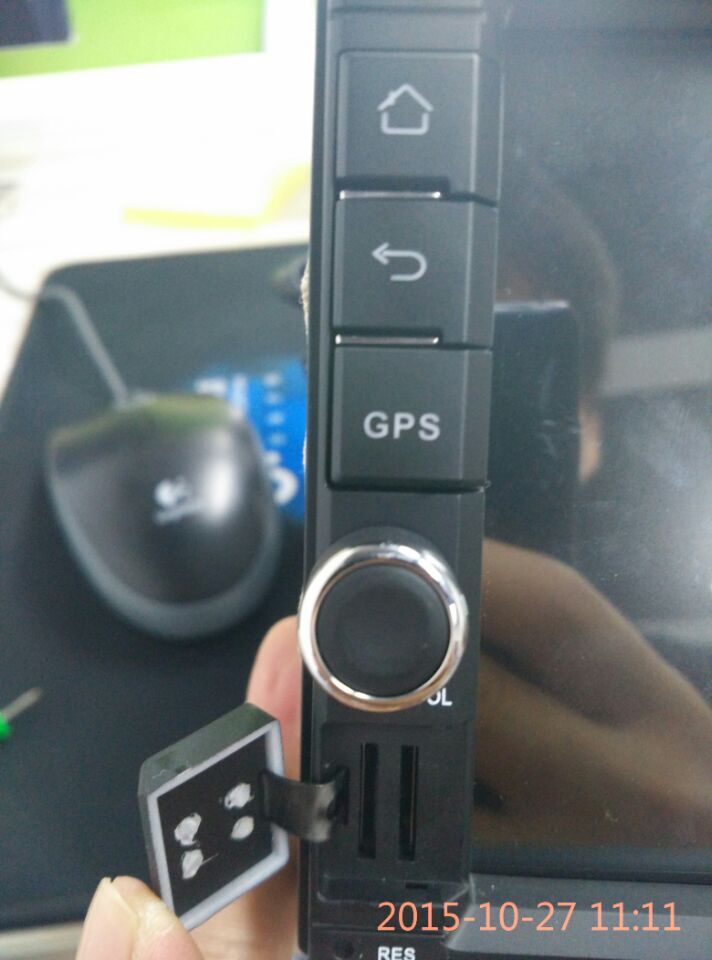
Please Insert the SD card Correctly

Model: JY-UQ124

After open the cover of SD slot, please pay attention to these two SD slot, they are different.


How to insert the SD card?  You should keep the sheet metal of SD cards in different direction, then insert into card slot.
Please follow the pictures below:


If you want to take the SD card out, you can press it with your finger or a thin stick 


Saturday, December 26, 2015

Instructional Video-- Full featured, easy to install in Toyota Rav4 2006-2012

Installation experience from Joying Customer:


Demo Video from Joying:


If you are interested in this Head Unit or Joying, please contact us:
E-mail: carjoying@163.com
Skype: amy-echo