I record the process step by step, and share the images.
1. Picture 1, Close the WiFi , and set my phone to 3G data. Then click "more"
2. Picture 2, Now, as you can see in this picture. I click "tethering&portable hotspot"
3. Picture 3, Turn on the "Portable hotspot" , and "set up portable hotspot"
4. Picture 4, After I click set up portable hotspot. Then, I set the password "123456789", and click "OK" and save successfully.
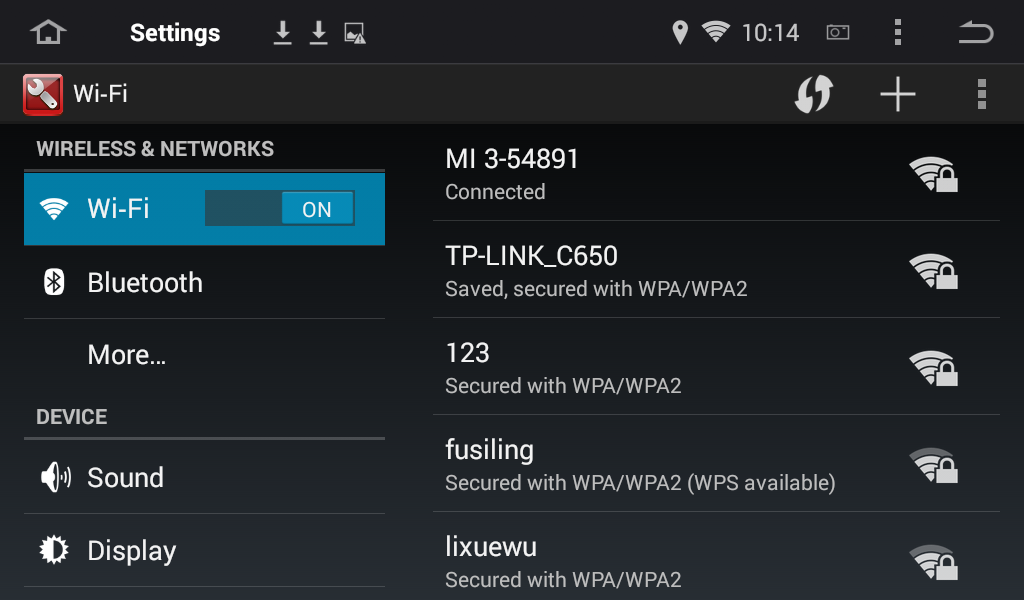
5. Picture 5, I boot the head unit. And open the "setting" of the unit.
Turn on "Wi-Fi", this unit searched the network "MI 3-54891"
6. Picture 6, select MI 3-54891, now you need to enter password
7. Picture 7, Enter "123456789", and click "connect"
8. Picture 8, Obtaining IP address
9. Picture 9, Connected
10. Picture 10, Open the page successfully.



Demo Video:


